Workspace Dashboard Upgrade: Quick Actions, Better Charts & Invoice Health Insights
We’ve upgraded the Classified Billing workspace dashboard to make it faster, clearer, and more action-focused.
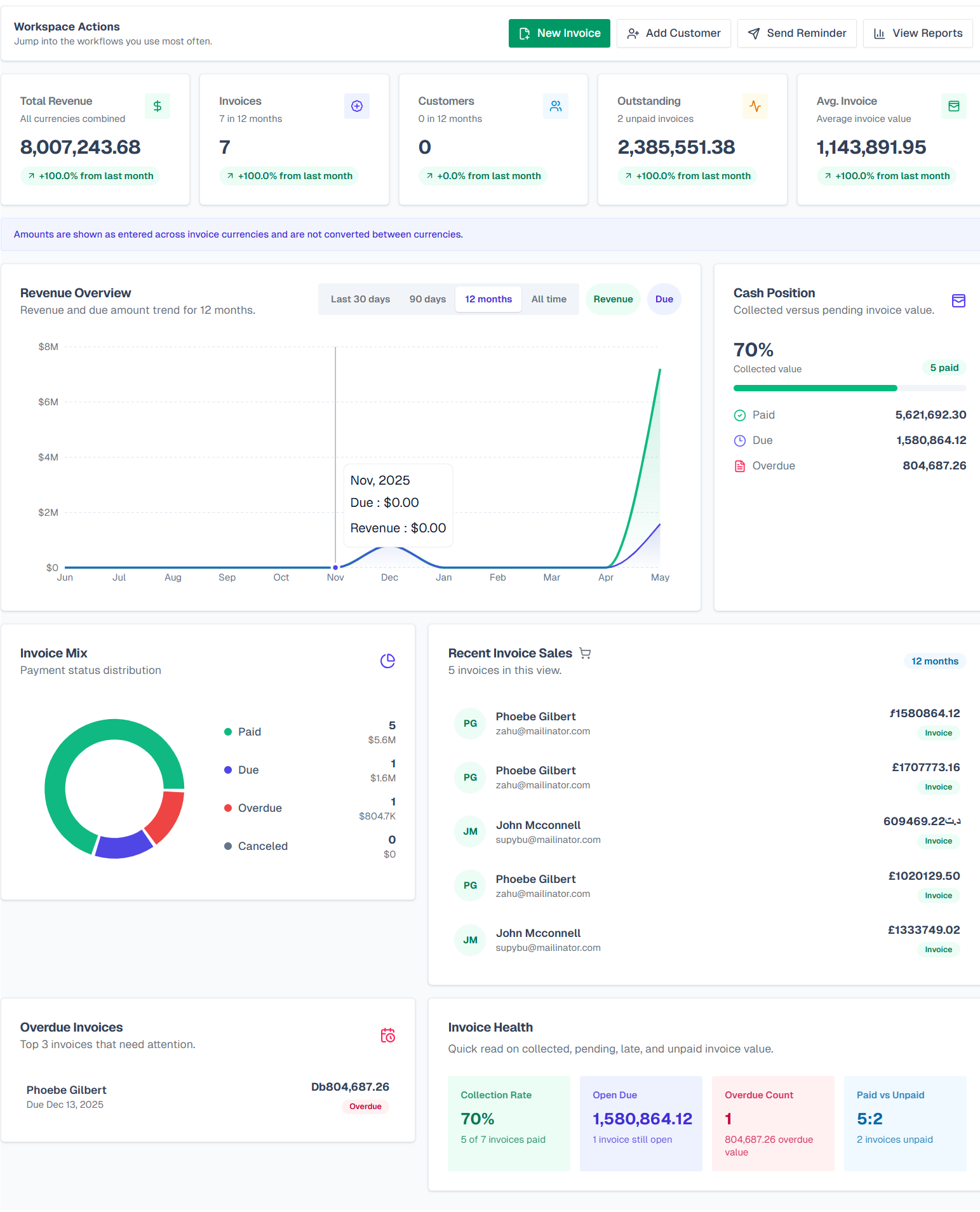
Previously, the dashboard provided a simple overview of revenue, invoices, customers, and recent sales. With this update, it now works more like a complete billing command center — helping you quickly understand your workspace activity, identify unpaid or overdue invoices, and jump into important workflows without digging through the sidebar.
✨ What’s New
Quick Actions at the Top
Access your most-used workflows directly from the dashboard:
-
New Invoice
-
Add Customer
-
Send Reminder
-
View Reports
The New Invoice button now opens the invoice template selection popup first, allowing you to choose the right invoice layout before creating an invoice.
Improved Revenue Overview
The revenue section now includes a cleaner chart with an upgraded emerald and indigo visual style.
You can compare:
-
Revenue
-
Due Amount
Available filters:
-
Last 30 Days
-
Last 90 Days
-
Last 12 Months
-
All Time
This makes it easier to understand both short-term and long-term billing trends.
New Cash Position Summary
A new Cash Position card gives you a clearer view of collected versus pending invoice value.
It includes:
-
Collection Rate
-
Paid Amount
-
Due Amount
-
Overdue Amount
-
-
Invoice Mix Chart
We added a visual invoice status distribution chart so you can quickly understand your billing breakdown across:
-
Paid
-
Due
-
Overdue
-
Canceled
-
-
Improved Recent Invoice Sales
Recent sales now appear in a cleaner and more readable layout showing:
-
Customer Name
-
Email Address
-
Invoice Amount
-
Invoice Status Badge
-
-
Overdue Invoices Mini List
The dashboard now highlights overdue invoices that need immediate attention, including:
-
Customer
-
Due Date
-
Amount
This makes follow-ups much faster and more practical.
Invoice Health Metrics
A dedicated Invoice Health section now helps you monitor billing performance with metrics like:
-
Collection Rate
-
Open Due Amount
-
Overdue Count
-
Paid vs Unpaid Ratio
These insights help you quickly understand whether your billing workflow is healthy or needs attention.
Currency Handling Note
Because Classified Billing supports invoices in multiple currencies, the dashboard now clearly indicates that amounts are displayed exactly as entered and are not automatically converted between currencies.
Why This Update Matters
This upgrade is focused on speed, visibility, and decision-making.
Instead of only showing static numbers, the dashboard now helps answer practical questions like:
-
How much revenue have I collected?
-
How much is still unpaid?
-
Which invoices are overdue?
-
How healthy is my invoice collection?
-
What should I do next?
The upgraded workspace dashboard is now live inside every Classified Billing workspace.
 Powered by ProductLift